
Why SynthEyes?
Streamlined Export and Compatibility
Expert Lens Calibration and Precise Scene Configuration
Empowering Creators with Value and Knowledge
Trusted By The Industry's Best
Behind The Scenes
Export to Your Favorite Application
Work in standalone
macOS
Windows
Linux
System requirements
Operating System
- macOS Monterey version 12.7.6 or later.
Processor (CPU)
- SynthEyes is a universal binary for Apple silicon, or Intel Macs with AVX support (Sandy Bridge or later). Rosetta is not supported.
Machine Learning (ML) features such as Mask ML and ML Motion Estimation require Apple silicon.
System Memory (RAM)
- Minimum 8 GB RAM. 16 GB recommended. Professional, 360VR, ML, and film users typically use 16โ32 GB or more.
Apple silicon systems use unified memory; 16 GB or more is strongly recommended due to the shared CPU/GPU memory architecture.
Graphics Processor (GPU)
- All Apple silicon GPUs are supported.
On Intel Macs an AMD Radeonโข PRO Series GPU with 8 GB VRAM minimum is required.

Operating System
- Windows 10 or later
Processor (CPU)
- Intel or AMD x64 processor with AVX (Sandy Bridge or later, or comparable AMD).
System Memory (RAM)
- Minimum 8 GB RAM. 16 GB recommended. Professional, 360VR, ML, and film users typically use 16โ32 GB or more.
Graphics Processor (GPU)
- 8 GB VRAM minimum. 16 GB VRAM recommended for ML plug-ins, RED decode, and high-resolution workflows. Machine Learning (ML) Plugins require an NVIDIA GPU with compute capability 6.0 or above (Pascal), or an AMD Radeonโข PRO Series GPU. If an appropriate GPU is not available, ML plug-ins can run on the CPU with significantly degraded performance.

Operating System
- RHEL 8+ (Red Hat Enterprise Linux) or an equivalent compatible Linux distribution such as Rocky or Alma Linux, on x86_64.
Processor (CPU)
- Intel or AMD x86_64 processor with AVX (Sandy Bridge or later, or comparable AMD).
System Memory (RAM)
- Minimum 8 GB RAM. 16 GB recommended. Professional, 360VR, ML, and film users typically use 16โ32 GB or more.
Graphics Processor (GPU)
- 8 GB VRAM minimum. 16 GB VRAM recommended for ML plug-ins, RED decode, and large multi-head configurations. Machine Learning (ML) Plugins require an NVIDIA GPU with compute capability 6.0 or above (Pascal). If an appropriate GPU is not available, ML plug-ins can run on the CPU with significantly degraded performance.

Mocha Point Tracker
A new affine-aware point tracker delivers more stable supervised tracking.Live Preview for GeoH
Real-time GeoH refinement for articulated objects and hierarchies.UI Modernization (Phase I)
Clearer layouts, improved readability, and a cleaner visual foundation โ without disrupting established workflows.USD / USDZ Pipeline Support
Expanded USD scene and asset import streamlines modern visual effects pipelines.
Mocha Point Tracker: Affine-Aware Supervised Tracking
SynthEyes 2026 introduces an affine-aware point tracker powered by Mocha technology. Instead of tracking a single-pixel feature, it tracks motion across a small planar patch and returns a stable 2D point for subsequent processing.
The result? Significantly reduced drift on rotating, scaling, or partially blurred surfaces without changing how artists work in the Tracker Room.
- Handles Affine Motion: Tracks rotation, scale, and skew in addition to translation
- Reduces Drift: Holds patterns through rotation, zoom, and motion blur where standard trackers tend to slip
- No Workflow Change: Works inside the familiar supervised Tracker Room workflow
- Cleaner Solve Input: Feeds more stable 2D data into the 3D solve and downstream exports
Live Preview for GeoH: Real-Time Interactive Solving
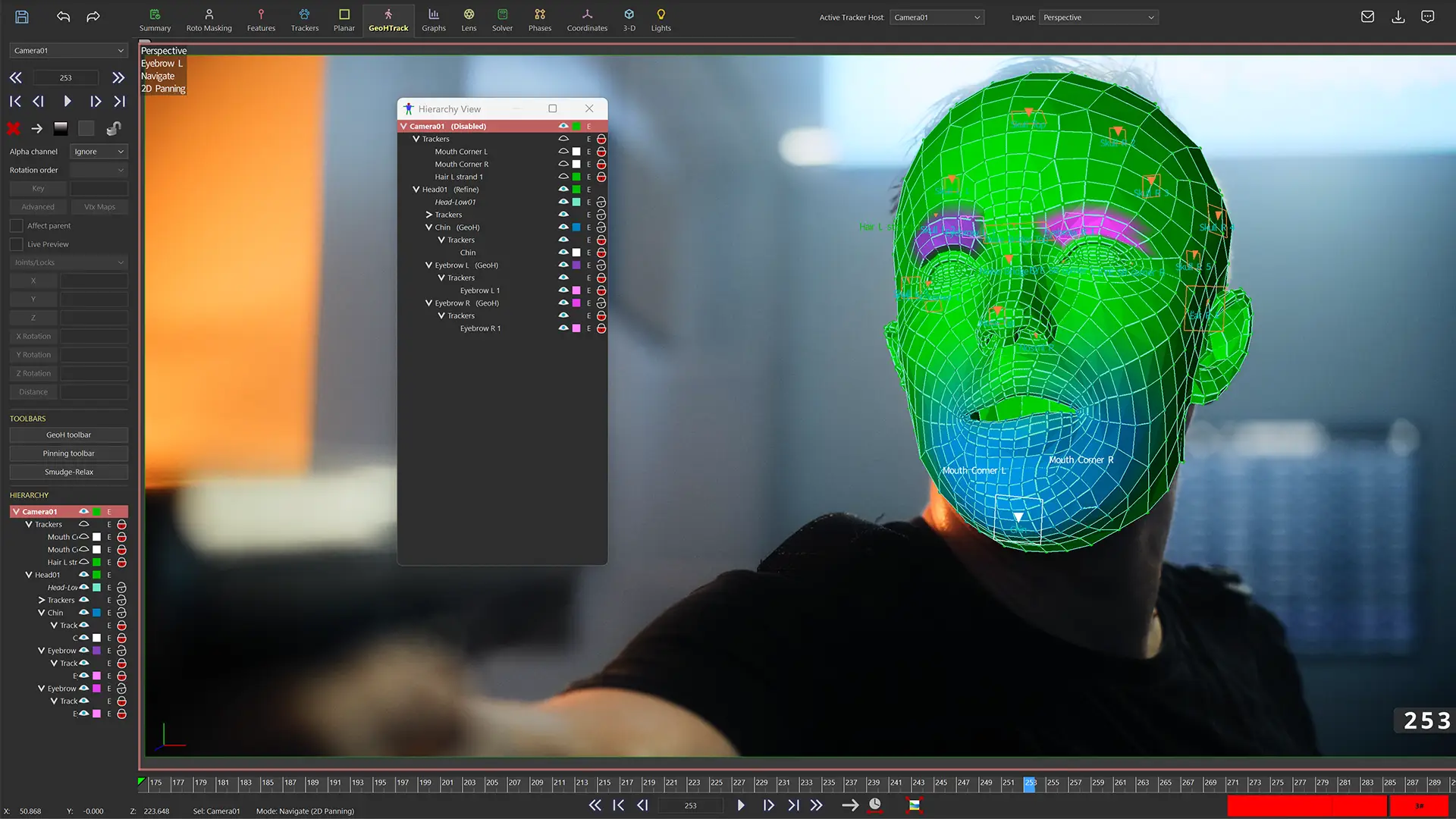
Live Preview transforms iterative GeoH refinement into a direct, responsive process. Adjust GeoH trackers, pivots, and constraints, and see the result immediately on the current frame.
Instead of scrubbing or playing the timeline to trigger a solve, the object updates live as you work, keeping complex hierarchy relationships visible and responsive while you dial in motion.
- Instant Feedback: Objects update immediately as trackers, pivots, or constraints move
- Faster Iteration: Eliminates repeated stopโsolveโcheck cycles during cleanup and refinement
- Designed for Iterative Setups: Keeps hierarchy relationships visible and responsive while dialing in rotation, articulation, and balance
- Direct, In-Context Editing: Make adjustments without breaking flow or switching modes
User-Interface Updates
SynthEyes 2026 introduces the first phase of a broader UI modernization effort, while preserving established workflows and muscle memory for experienced users.
- Clearer Organization: Improved grouping and labeling of controls
- Improved Readability: Better spacing and alignment reduce visual density
- Subtle Visual Hierarchy: Light color accents help separate functional areas
- Scrollable Panels: Easier access to larger toolsets in the left-hand panel
- Cleaner Preferences: Simplified and more discoverable configuration
USD / USDZ Import: Expanded Pipeline Integration
Bring more complex scene data directly into SynthEyes.
SynthEyes 2026 expands support for USD-based workflows, improving interoperability with modern, USD-centric pipelines and reducing the need for intermediate conversions.
- Broad Format Support: Import USD, USDA, USDC, and USDZ assets
- Scene-Level Imports: Bring in full scenes with hierarchy, cameras, and lights
- Preserved Structure: Parent-child relationships and transforms are retained
- Embedded Textures: USDZ assets import with textures intact
Pipeline & Workflow Improvements
SynthEyes 2026 adds a collection of targeted enhancements that streamline scene setup, improve export reliability, and reduce friction across common production workflows.
- Integrated Distortion Map (STMap) Export: Distortion map generation is now part of the standard Export menu and Multi-Export system. Generate all required deliverables in a single pass.
- Whole Scene Transform Mode: Apply scale, rotation, or translation to the entire scene, including cameras, objects, trackers, and meshes. Preserves relative motion and solve integrity.
- Texture-Based Plane Aspect Matching: Planes can automatically match the aspect ratio of applied textures, simplifying bitmap, satellite image, and forensic alignment workflows.
- Flexible Import Scripts: Sizzle importers support multiple file extensions, reducing custom script maintenance.
- Safer Export Paths: A new tag resolves to the userโs Documents directory, preventing invalid or inaccessible export locations.
- Improved Houdini Exports: Whitespace in names is automatically converted to Houdini-safe identifiers, avoiding import errors.
Production Grade Tracking and Solving
SynthEyes offers a comprehensive toolkit for professional camera and object tracking, combining supervised workflows with high-performance automation, real-time interactive refinement, flexible solve controls, and precision export support.
- Advanced tracking features, including automatic tracking, 3D planar tracking, and AprilTags, with tools for cleanup and adding trackers
- Track cameras and moving objects using geometric hierarchy tracking, with support for stereoscopic 3D workflows
- Precise 3D and 2D planar tracking with mask options and Mask ML for machine-learning-driven object isolation
- Use ML Motion Estimation to generate per-pixel motion vectors, improving auto-tracking accuracy and reducing cleanup in complex shots
- Affine-aware supervised point tracking powered by Mocha technology, allowing tracks to follow rotation, scale, and skew in addition to translation
- Handle multiple supervised trackers simultaneously with intuitive selection and organization tools
- Calibrate a wide range of lens types, including radial-4th and anamorphic-6th models with animated distortion parameters
- Ideal for 360ยฐ VR, motion capture, and long or complex sequences, with built-in 360ยฐ stabilization tools
- Interactively refine object and hierarchy motion using Live Preview, with immediate visual feedback during adjustment
- Refine camera and object paths using flexible solver settings and post-solve cleanup tools
- Align solves to 3D set models such as lidar scans for seamless integration
Scene Exports
SynthEyes provides powerful export tools to integrate your tracked scenes into 3D and compositing workflows with accuracy and control.
- Multi-Export, a centralized export hub, enabling simultaneous setup of multiple export scenarios (e.g., Nuke, Maya, Blender)
- Built-in and custom presets, allowing quick application or modification of export configurations at user, scene, or facility levels
- Object inclusion/exclusion features, providing fine control over which trackers or objects are exported to reduce file clutter
- Persistent and flexible configurations, saving entire export setups for quick reuse on future shots
- Native project data export to 3D packages, ensuring seamless transfer to Maya, 3ds Max, Blender, LightWave, and Cinema 4D without data loss
- Compositing integration, facilitating the creation of project scenes in After Effects, Nuke, Fusion/Resolve, Flame, and Houdini
- USD and USDZ export support for modern pipeline integration
- Flexible Lens Workflow Export, ensuring consistent and distortion-aware exports across all major formats
- Advanced pipeline capabilities, offering flexible ASCII text exporters for tracker 2D paths, 3D positions, camera/object paths, and animated illumination
Coordinate System Setup
SynthEyes offers powerful tools to position, align, and size the entire scene in a 3D environment, so you can ensure the world scale and coordinates of your scene match the rest of your workflow.
- Auto-placement tool analyzes scene structure to create a good initial coordinate system
- Quick precision setup wizard: click 3 trackers, then realign
- Flexible scene-wide transform tools for adjusting scale, rotation, and alignment while preserving relative motion
- Easy manual re-positioning and scaling of the entire scene
- Line-based alignment system for nodal-tripod and lock-off shots, or use the mesh pinning tool in its camera setting
- Flexible coordinate system alignment controls and coordinate placement methods based on camera positioning
- Constrained points (axis control) view to quickly examine and modify coordinate system settings of all trackers
- Select solutions using coordinate polarity controls when multiple solutions are possible
- Exact and distance constraints for survey data, including infrequent GPS waypoints and on-set sizing measurements
- Coordinate system setup available before or after solving
Lens Calibration
SynthEyes has extensive tools not only for calculating distortion during solving, but also for lens calibration from lens grids. Rectify lens grid for โjust fix itโ unmodeled lens distortion correction, especially for complex lens types. Tilt detection and correction if grid spacing and camera-to-grid measurements are available. Lens master calibration system handles linear, inverse linear, anamorphic lenses, and four fisheye lens variants.
- Rectify lens grid for distortion correction
- Calibration for various lens types
- Calibration methods including random-dot calibration
- Lens distortion presets for different workflows
- Lens distortion presets for different workflows; easier to manage with the (NEW) Workflow Presets Manager
Geometric Hierarchy Tracking
Spectacularly powerful and flexible toolset for 3D tracking multi-level constrained hierarchies of moving parts, directly tracking supplied meshes, or using normal (supervised) trackers.
- Toolset for tracking moving parts in 3D
- Tracking of kinematic chains and secondary animation
- Real-time interactive refinement of hierarchy motion using Live Preview
- Integration with motion capture for BVH export
Stabilization
SynthEyes features integrated stabilization for normal and 360VR shots driven by 3D solves, including creating a "physical" rig for export.
- Stabilization capabilities are built into the image preprocessor including normal (with lens distortion) and 360VR shots
- Stabilization driven by full 3D solves, or approximate 2D tracking data
- Manual adjustments as needed
- Automatic "zoom" determination for normal shots (multiple modes)
- Stabilization rig creator for non-360VR shots creates a "physical" equivalent for the stabilization, so downstream 3D packages can perform the actual stabilization
- Export of 360VR stabilization data directly to supported packages including After Effects, Fusion, and Hitfilm
- Setup of 360VR stabilization as an animated textured sphere for alternative export
- Integrated resampling to other output resolutions and aspects
Object Separation
SynthEyes simplifies object separation by isolating moving subjects and excluding unwanted areas from tracking. By combining advanced machine-learning with traditional region tools, it ensures that only the essential elements are tracked, delivering cleaner, more accurate 3D solves and significantly reducing tedious manual rotoscoping.
- Rapid object isolation with Mask ML, which tracks moving objects and generates precise garbage mattes for faster, more accurate 3D solves
- Automatic selection of trackers within green screen regions
- Flexible region setup for moving objects or actors using either Mask ML or traditional garbage mattes
- Keyframe-animated splines, including quick square and circle spline setups, for defining tracking regions
- Importing spline control points from tracker paths for rapid region setup
- Animated enable/disable for splines
- Rotoscoped alpha-channel support for refined object separation
ViewShift System
Use ViewShift for complex object removals, combining split takes, generating animated texture maps, and more!
- Camera mapping and rendering system
- Uses matchmoved 3D camera paths and set models
- Removes objects against various reflector meshes (not just planes)
- Quick setup tools for working from a clean plate
- Illumination compensation for better matching
- Multiple timing modes
- Control via animated splines or mesh outlines
- Various output modes for previews and compositing
- Matte generation with softening
- Animated texture maps from meshes
- Multiple independent ViewShift outputs
Meshes In/Out
SynthEyes reads and writes a variety of mesh and vertex cache formats, ensuring easy exchange with major 3D and compositing applications.
- Import/export OBJ, C4D, COLLADA (DAE), DXF, PTS, LWO, XYZ Lidar, SynthEyes SBM, and more
- USD and USDZ scene and mesh support for modern pipelines
- Vertex caches in/out: Alembic (.abc), Maya .mcx, Lightwave .mdd, 3dsmax .pc2
- Built-in Mesh Options for quick insertion into SynthEyes scenes
- Mesh-to-Tracker Parenting enables fast, accurate alignment of meshes to motion-tracked points
- Animation-Ready Head Mesh offers quick tracking for close-up head and facial shots, providing a pre-rigged foundation for digital makeup or beauty work
Scripting
Unleash next-level power through typed or spoken natural language control with Synthia, or use Sizzle or Python scripting for more traditional automation.
- Native Sizzle or Python API/SDK
- Synthia: a natural language assistant that turns plain language into script commands
- Script-based modifications and extensions to SynthEyes functionality, with direct access to scene and image preprocessing
- Enhanced script management made simpler with the Workflow Presets Manager for global or per-project settings
Workflow Presets Manager
The Workflow Presets Manager is the backbone of preset configuration, offering a robust, hierarchical framework that drives consistency and flexibility across your entire pipeline. It empowers key features like the Project Selector and Multi-Export by capturing complete project setups and automating export management, streamlining even the most complex workflows.
- Multi-Level Preset Management offers built-in, facility, user, and scene levels that cater to every pipeline scenario.
- File Templating and Shot Presets enable the creation of flexible templates and shot-level presets for streamlined workflows.
- Preset Tags standardize file naming and organization to maintain uniformity across projects and teams.
- Project Selector launches every project with reproducible settings by capturing your current preferences into reusable presets.
Learn how to use SynthEyes and take your matchmoving skills to the next level with this comprehensive training course.
Over 3.5 hours of training videos to get you up and running quickly.
Stream it for free or purchase here for downloadable projects and assets.
Learn SynthEyes
Need Help? We've Got You!
Discord
Join our SynthEyes Discord to exchange tips, get quick help, and connect with fellow VFX artists.
Discord